


WordCamp Zürich 2019 presentation by Mirko Humbert
What is an aggregator?
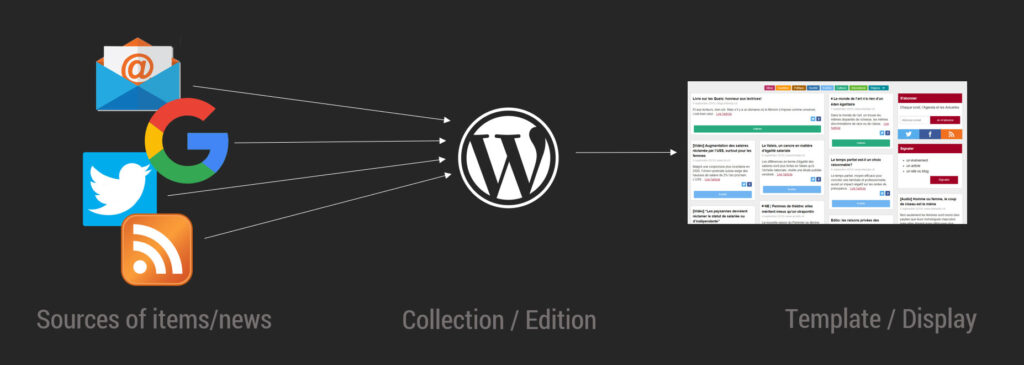
Definition: a website or program that collects related items of content and displays them or links to them.
Why use an aggregator?
- Monitoring information
- Curating news
- Creating archives
- Listing Jobs/Events
- Creating dashboards
- …
Who should use an aggregator?
- Individuals
- Bloggers
- Consulting firms
- Professional associations
- Community managers
- Editors
- …
1. Installing WordPress
Follow this tutorial if you don’t know how to install WordPress yet.
2. Install WPeMatico
Download and install WPeMatico from the link below. If you don’t know how to install a WordPress plugin, please read this page to learn how to install WordPress plugins.
Alternative plugins for feed aggregation
- WP RSS Aggregator – on wp.org
- WP Pipes – on wp.org
- Feedzy RSS Feeds Lite – on wp.org
- Super RSS Reader – on wp.org
- RSS Import – on wp.org
3. Find sources
- RSS Feeds (Wikipedia)
- Google Alerts (how to find the RSS feeds)
- Emails (converted to feed, example of tool)
- Web Pages (converted to feed, tool to do this)
- Zapier, IFTTT,…
- Twitter, Facebook,… (create RSS feeds from Twitter or from Facebook)
- …
4. Themes for aggregating
Use a free all-purpose theme, buy a dedicated premium theme, or build your own. Here is how to install a WordPress theme. Collection of aggregator WP themes (link).
5. Editing the News
- Works like editing regular posts
- Eliminate irrelevant posts
- Update feeds
- Source URLs come as custom meta fields
6. Take it further
Examples of tools built for ActuElles.ch:
- Newsletter builder
- Report builder